
Simple Tips for Organizing Your Home Workspace for Better Productivity

Creating an effective home workspace is key to staying productive and focused, especially when working remotely or managing tasks from home. A cluttered, disorganized area can lead to distractions and decreased motivation. Fortunately, organizing your workspace doesn’t have to be complicated or costly. Here are some simple, practical tips to help you design a home office that supports your productivity and makes work more enjoyable.
1. Choose the Right Location
Pick a Dedicated Spot
Find a quiet, comfortable corner or room in your home that can be reserved for work. Having a specific place dedicated solely to work helps your brain associate the area with productivity and focus.
Consider Natural Light
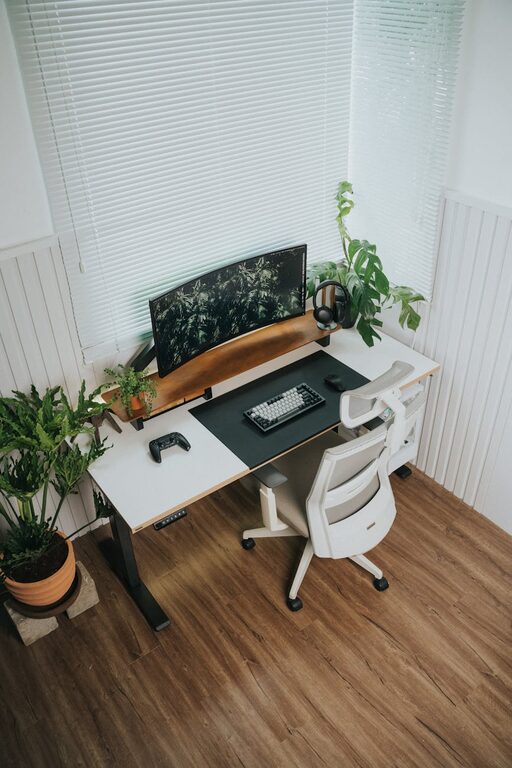
If possible, select a workspace near a window. Natural light not only reduces eye strain but also improves mood and energy levels throughout the day.
2. Declutter and Minimize
Keep Only Essentials
Start by removing unnecessary items from your workspace. Keep only the tools, documents, and gadgets you use daily within arm’s reach. Extra clutter can be distracting and make it harder to focus.
Use Storage Solutions
Invest in functional storage like shelves, filing cabinets, or desk organizers. These help keep paperwork, stationery, and electronics tidy and easy to find.
3. Organize Your Desk Efficiently
Keep Your Desk Clear
A clean desk surface encourages clear thinking. Try to limit the number of objects on your desk to your computer, a notepad, and a few essential supplies.
Use Vertical Space
If your desk space is limited, consider vertical organizers such as wall-mounted shelves, pegboards, or document holders to keep items accessible without crowding your work area.
4. Manage Cables and Electronics
Tame the Cords
Loose cables create clutter and can be hazardous. Use cable clips, ties, or a cable management box to keep cords organized and out of view.
Designate Charging Areas
Set up a specific spot for charging devices to avoid cords and gadgets spreading across your desk.
5. Personalize Mindfully
Add Inspiring Elements
Including a few personal touches like photos, plants, or artwork can make the space feel welcoming and boost motivation.
Avoid Overdecorating
Too many decorations can overwhelm your workspace. Keep your personal items minimal and meaningful.
6. Establish Daily Cleaning Habits
End-of-Day Tidy
Take five minutes before finishing work to clear your desk, file papers, and put things away. Starting the next day with a clean space saves time and reduces stress.
Weekly Deep Clean
Once a week, dedicate time to more thorough cleaning and reorganizing. This keeps clutter from building up and refreshes your environment.
7. Use Tools to Stay Organized
Digital Organization
Use task management apps or digital calendars to keep track of deadlines and appointments. This reduces the need for paper and helps keep your desk clear.
Label Everything
Label files, drawers, and storage bins. Clear labeling makes it easy to locate items and maintain organization over time.
8. Ergonomics Matter
Invest in Comfortable Furniture
Choose a desk and chair that support good posture. Being comfortable helps reduce fatigue and maintain focus.
Arrange Equipment Properly
Place your monitor at eye level and keep your keyboard and mouse within easy reach. Proper ergonomics prevent strain and make working easier.
—
Creating a well-organized home workspace is a balance of functionality and personal comfort. By following these simple tips, you’ll create an environment that promotes productivity, reduces distractions, and makes your workday more enjoyable. Remember, small, consistent changes can make a big difference in how you work at home.
Related Post
Tips for Creating a Productive Home Office Space
Learn effective tips to design a home office that boosts focus and productivity, making your [...]

How to Create a Cozy Reading Nook in Any Space
Discover practical tips to design a cozy reading nook that fits any room size and [...]

Tips for Creating a Cozy and Inviting Home Workspace
Learn how to create a cozy, comfortable, and inspiring home workspace with simple tips that [...]